How to start a turnkey eSIM business with the RoamGo Partner Program
Open your own travel eSIM shop under your brand: build the website, take card payments on your own Stripe account, and run support, AI answers, analytics and customer records from one partner panel.
Travelers now buy their mobile data before they board, and most of them buy it from whoever they already trust for the trip: a travel agency, a tour operator, a hotel, a creator they follow. The RoamGo Partner Program lets that business sell travel eSIMs under its own name, without building a catalogue, a checkout or a support stack from scratch.
The model
How a RoamGo partner business works
You sell under your own brand, on your own shop, at the prices you set. When a customer buys, the eSIM is paid from your prepaid partner balance at partner prices, and RoamGo delivers it to your customer automatically. Partner prices are up to 60% below RoamGo's retail prices, depending on the plan, and every plan's partner price is visible in the panel before you fund or order.
Everything else in this guide lives in one place, the partner panel at partners.roamgo.net: the website builder, payments, reports, the customer inbox, the AI Operator, analytics and your customer list.
- A free partner account with no monthly fee
- $50 of reusable credit to go live, then top-ups from $20
- Travel eSIMs for 190+ countries, delivered automatically
- Your brand, your prices and your customer relationship
Step 1
Build your shop with the website builder
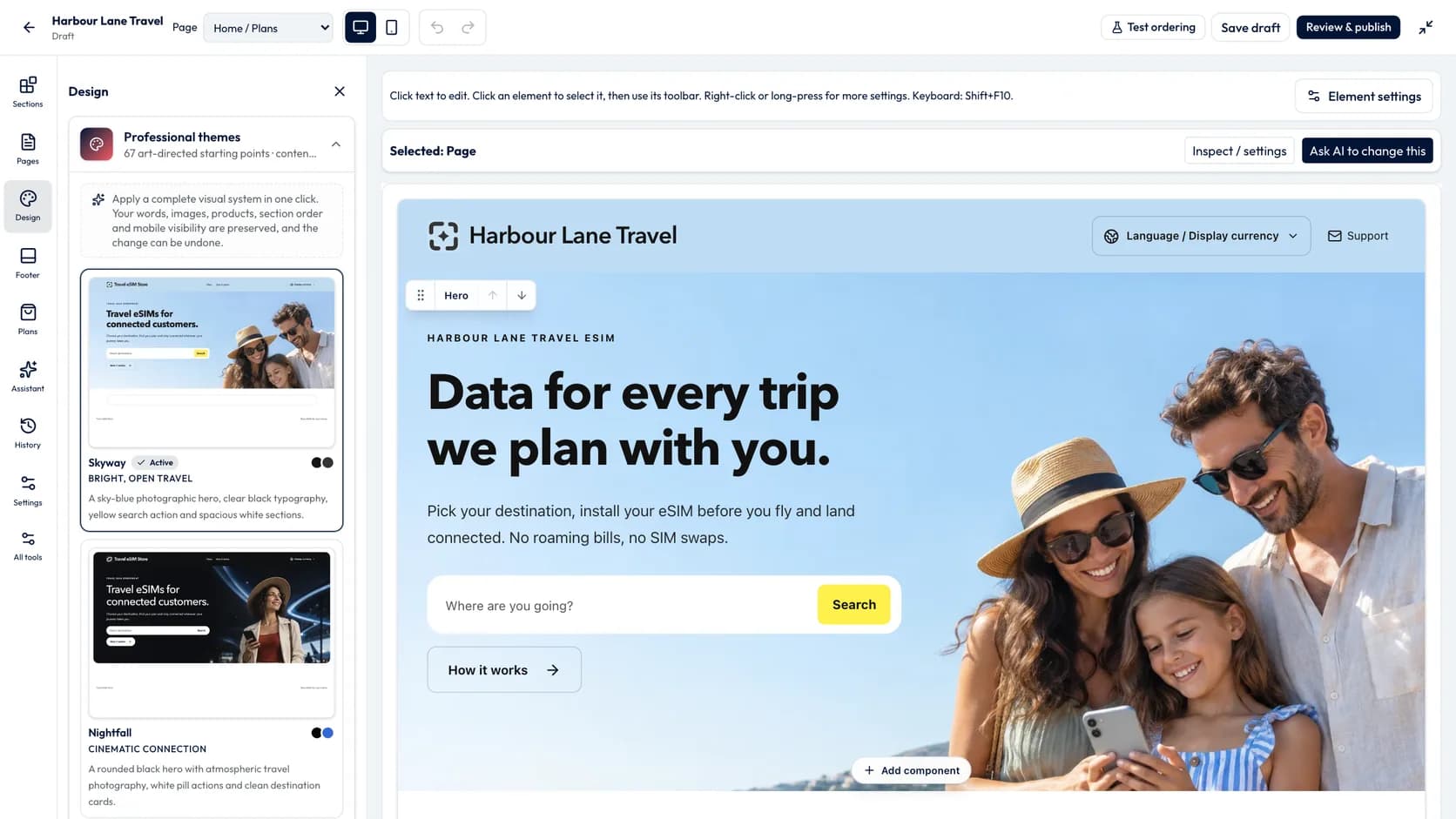
The website builder walks you through five steps: brand, plans, payments, domain and settings. In the studio you edit sections and pages, pick a theme from the gallery, and preview the shop on desktop and phone. Changes save as a draft automatically, and earlier versions are kept so you can go back.
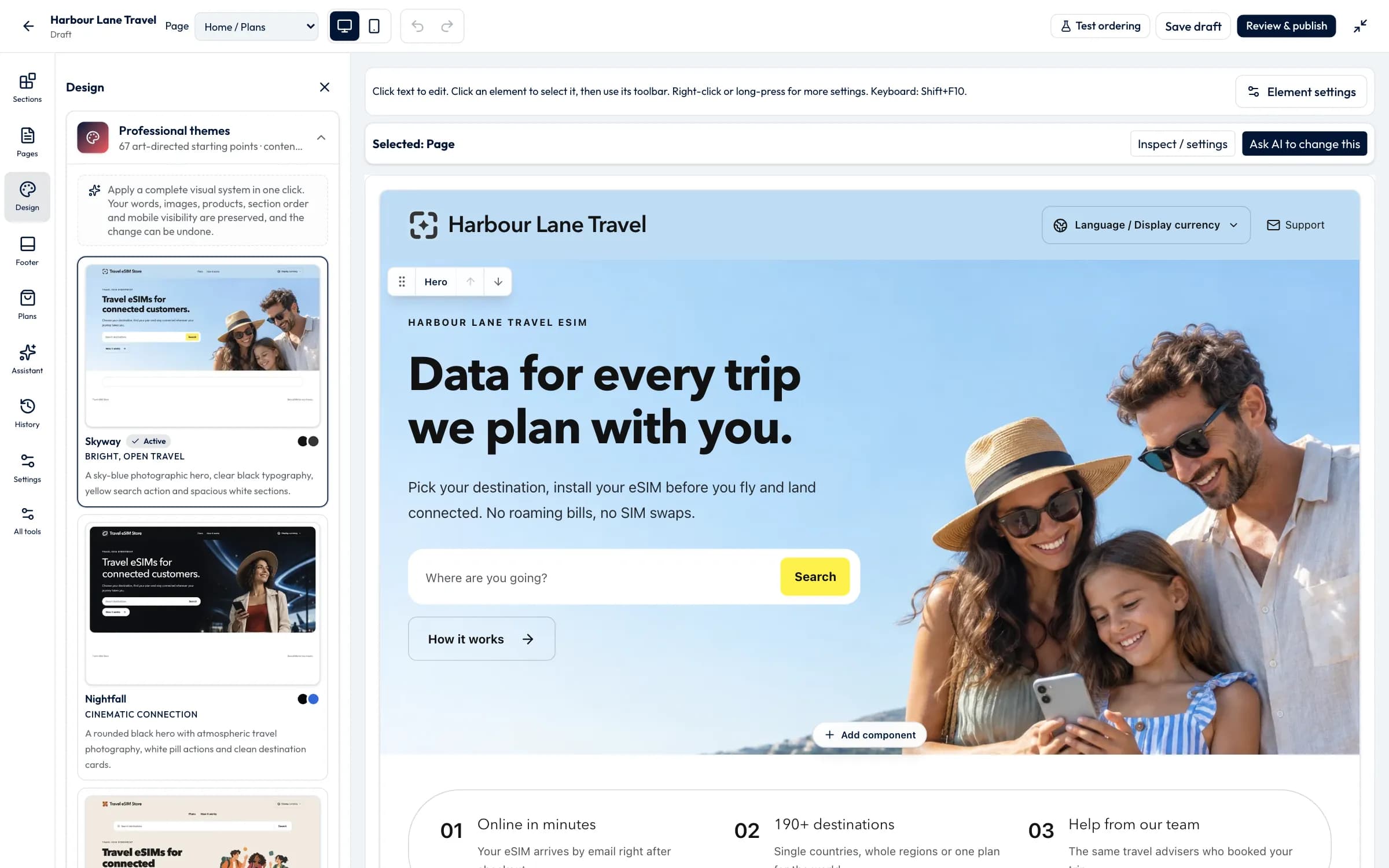
The AI designer takes a request in plain words, a website you like or a screenshot, and proposes changes you review before they apply. Your shop can be shown in 18 languages. It works straight away on a free address, and you can connect a domain you own whenever you are ready.
Designing and saving a draft is free. Publishing the shop and taking live orders starts once your first $50 of credit is in.
Step 2
Get paid on your own Stripe account
Payments run through Stripe Connect. You connect your own Stripe account with Stripe's standard sign-in, and each sale is charged directly on that account. The money from a sale is yours: RoamGo takes no fee from the payment, because your eSIMs are paid from your prepaid partner balance instead.
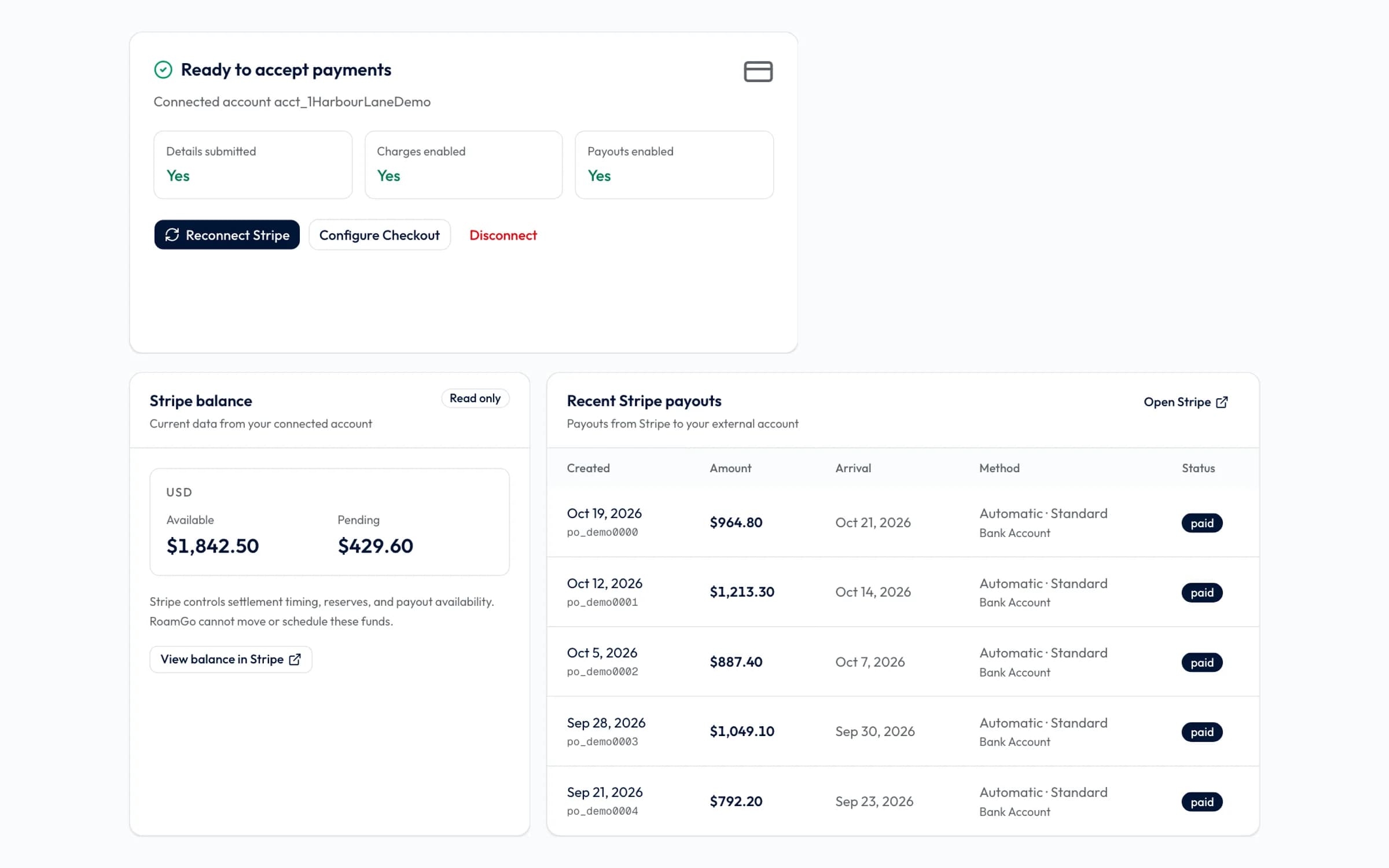
The Payments page shows Stripe's verification checks, your available and pending balance, recent payouts, checkout conversion with the top reasons payments fail, and a searchable payments ledger you can export as CSV.
Step 3
Close the month with accounting exports
Reports gives you your sales for any period: gross sales, tax and refunds by currency, a statement of your partner credit, and CSV downloads. One click packs an Excel workbook, the CSVs and RoamGo's own invoices to you into a ZIP for your accountant.
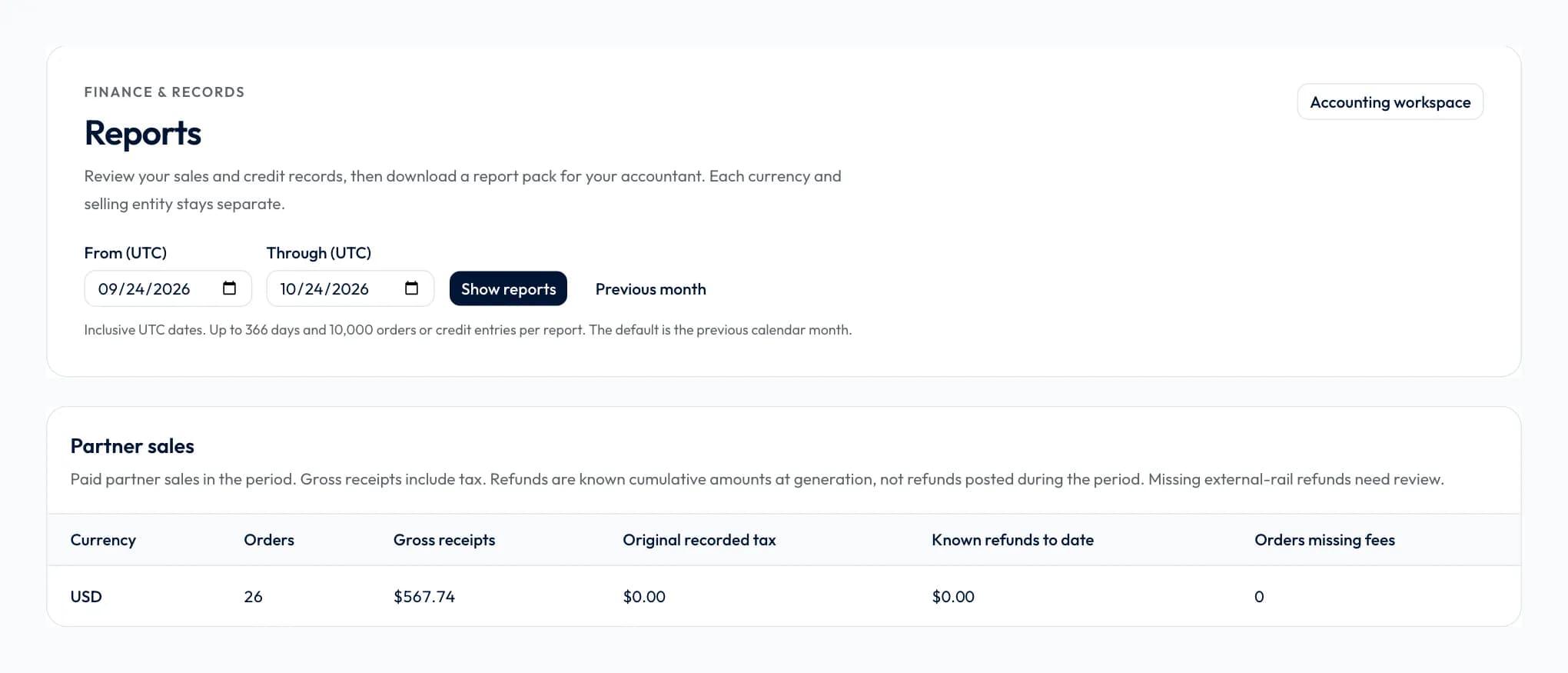
The accounting workspace adds a sales register in Excel or CSV, journal files for QuickBooks and Xero, processor statement imports and locked period closes. Invite your bookkeeper with a read-only Accountant seat. The files are downloads: nothing is posted to your accounting software for you, and tax stays your accountant's call.
Step 4
Answer customers from RoamDesk and the customer inbox
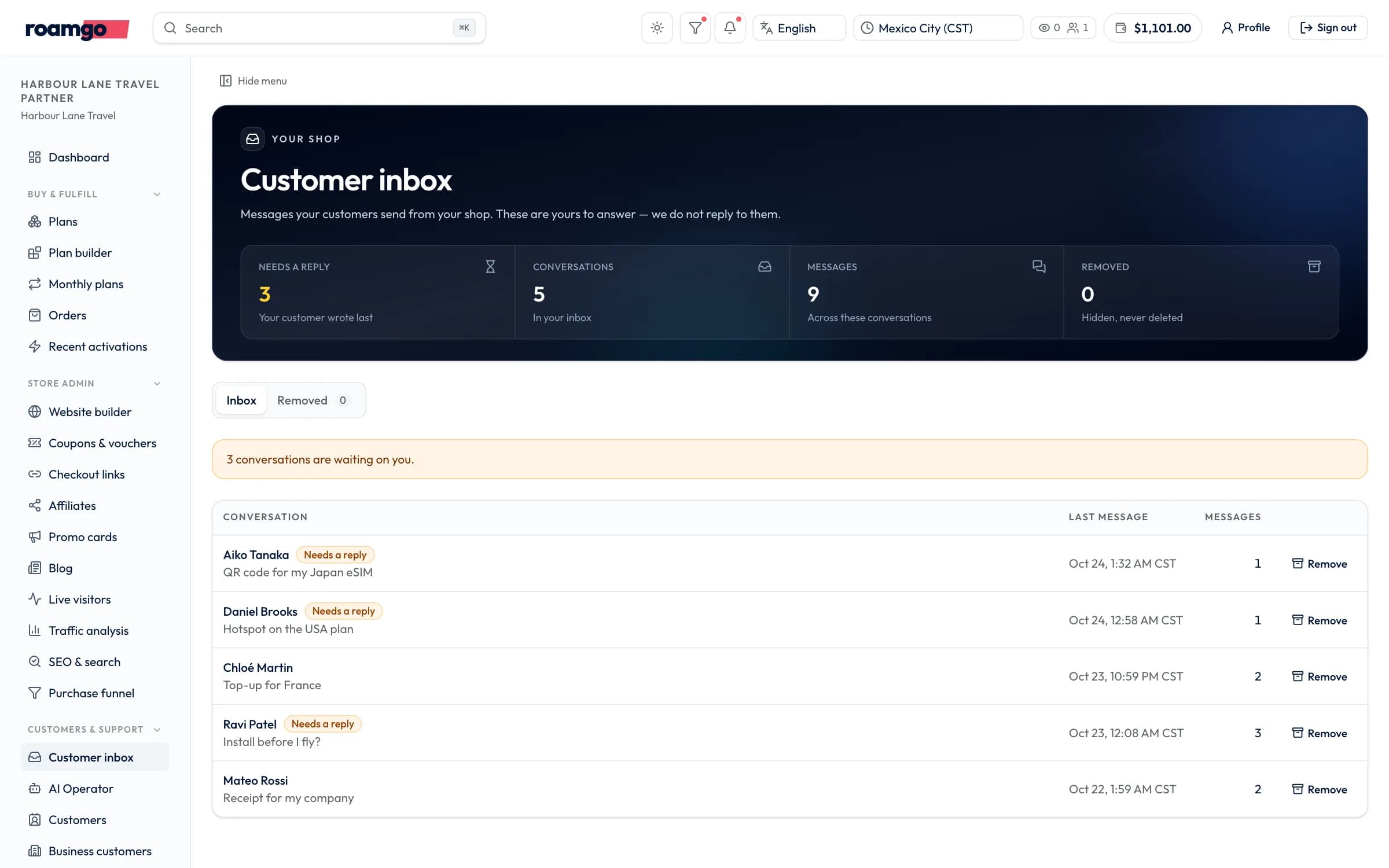
Every live shop has a message button in the corner. Messages from it, and support email you forward, land in your Customer inbox in the panel, where your team replies and the customer gets the answer by email. These conversations are yours: RoamGo never answers your customers for you. Invite teammates with their own roles, such as support, shop manager or a read-only accountant, and set on-call schedules and service levels so nothing waits too long.
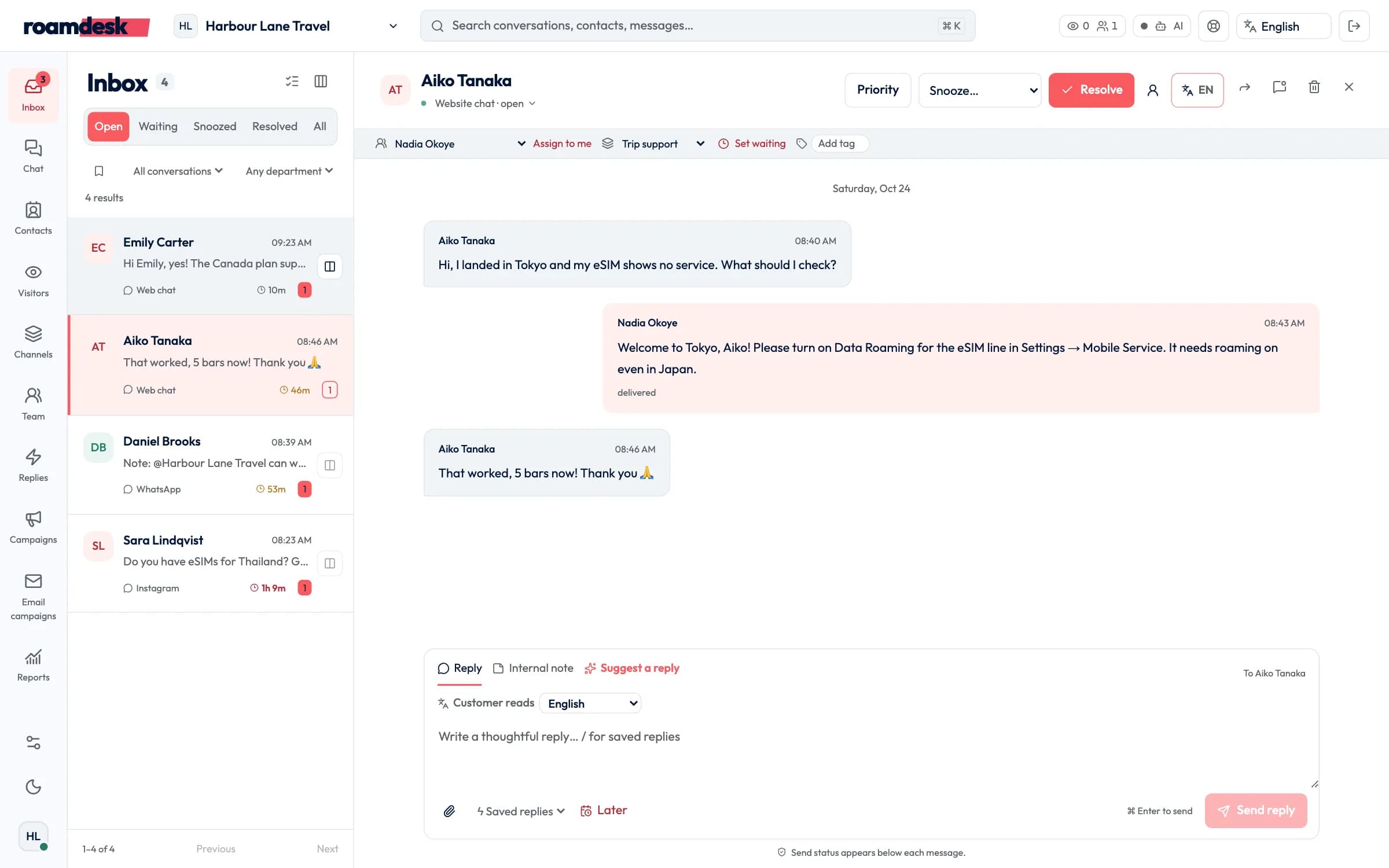
For live chat across channels there is RoamDesk, RoamGo's team inbox. It brings website chat, WhatsApp, Telegram, Messenger, Instagram and LINE into one queue, with departments, assignment, internal notes with @mentions, saved replies, service levels and reports. Next to each conversation it shows the customer's orders and eSIM status from your shop.
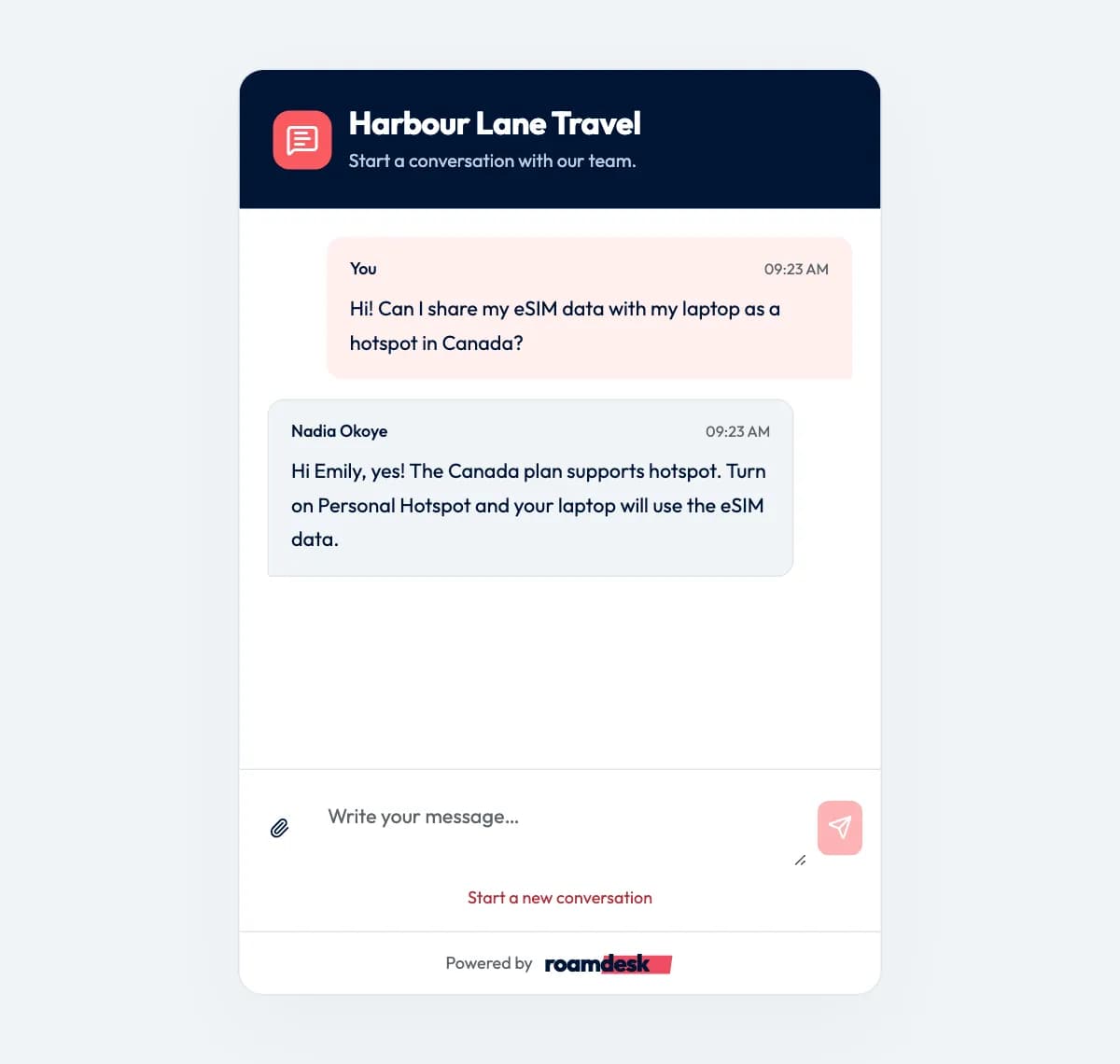
On a visitor's screen, RoamDesk's website chat is a live chat window: they type, and your agent answers in the same conversation in real time.
RoamDesk is in a private pilot, by invitation, with plans from $39 a month paid from your partner credit. The Customer inbox and the shop's message button come with every partner account.
Step 5
Let the AI Operator take the first questions
The AI Operator is a chat assistant on your shop. It answers in the customer's language, searches your plans at your prices, checks whether a phone supports eSIM, and shows a card that opens your checkout for the plan the customer picks. Once a customer confirms their email with a one-time code, it can look up their orders, eSIM status and data usage.
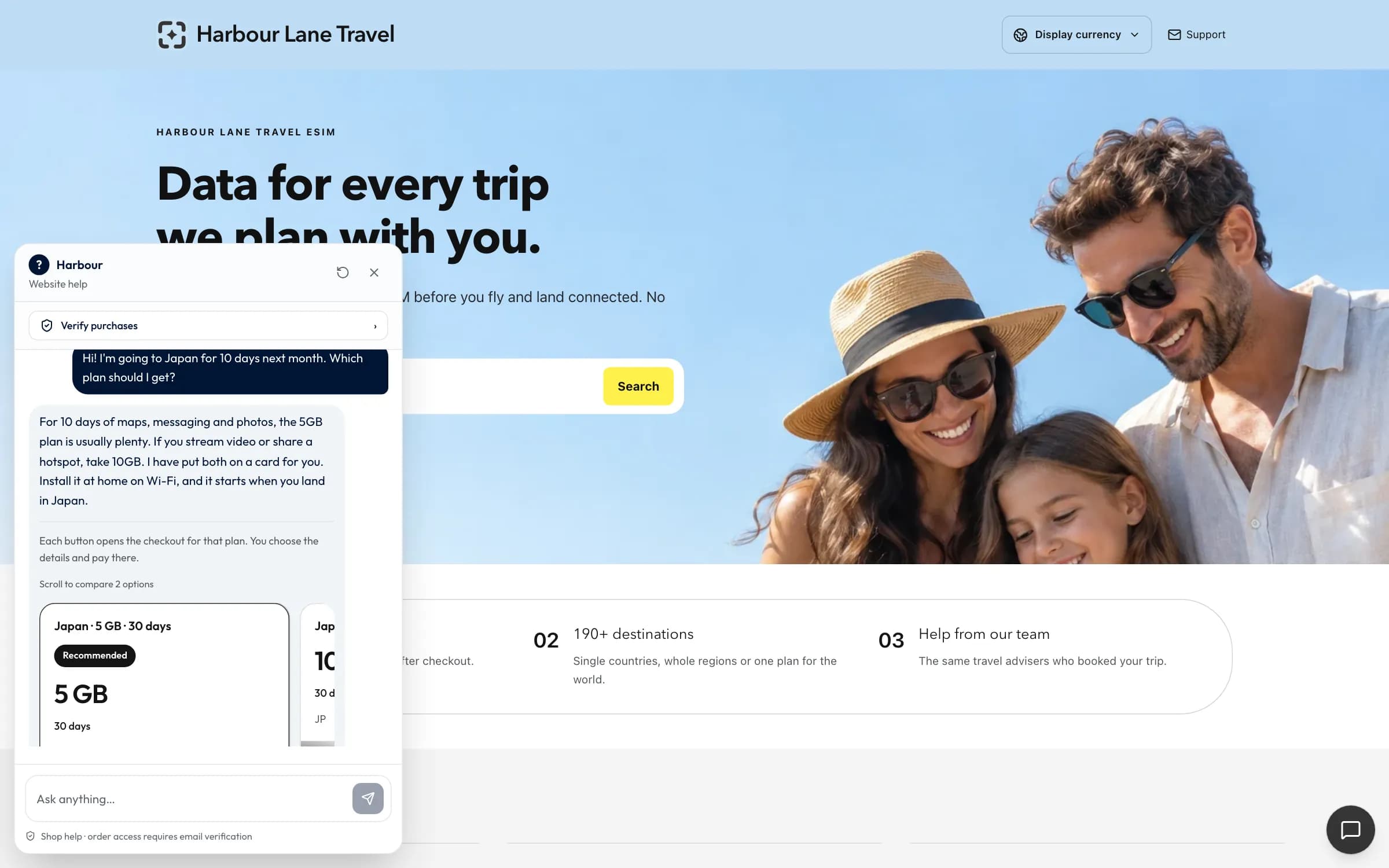
You decide what it knows and how it sounds: add knowledge articles or import pages from your website, set its name, tone, greeting and sign-off, and try it in a sandbox before customers do. When someone wants a person, it hands them to your inbox with the conversation attached. Plans start at $29 a month, paid from your credit, and it pauses at its monthly limit instead of charging overages.
Step 6
Grow with built-in analytics and CRM
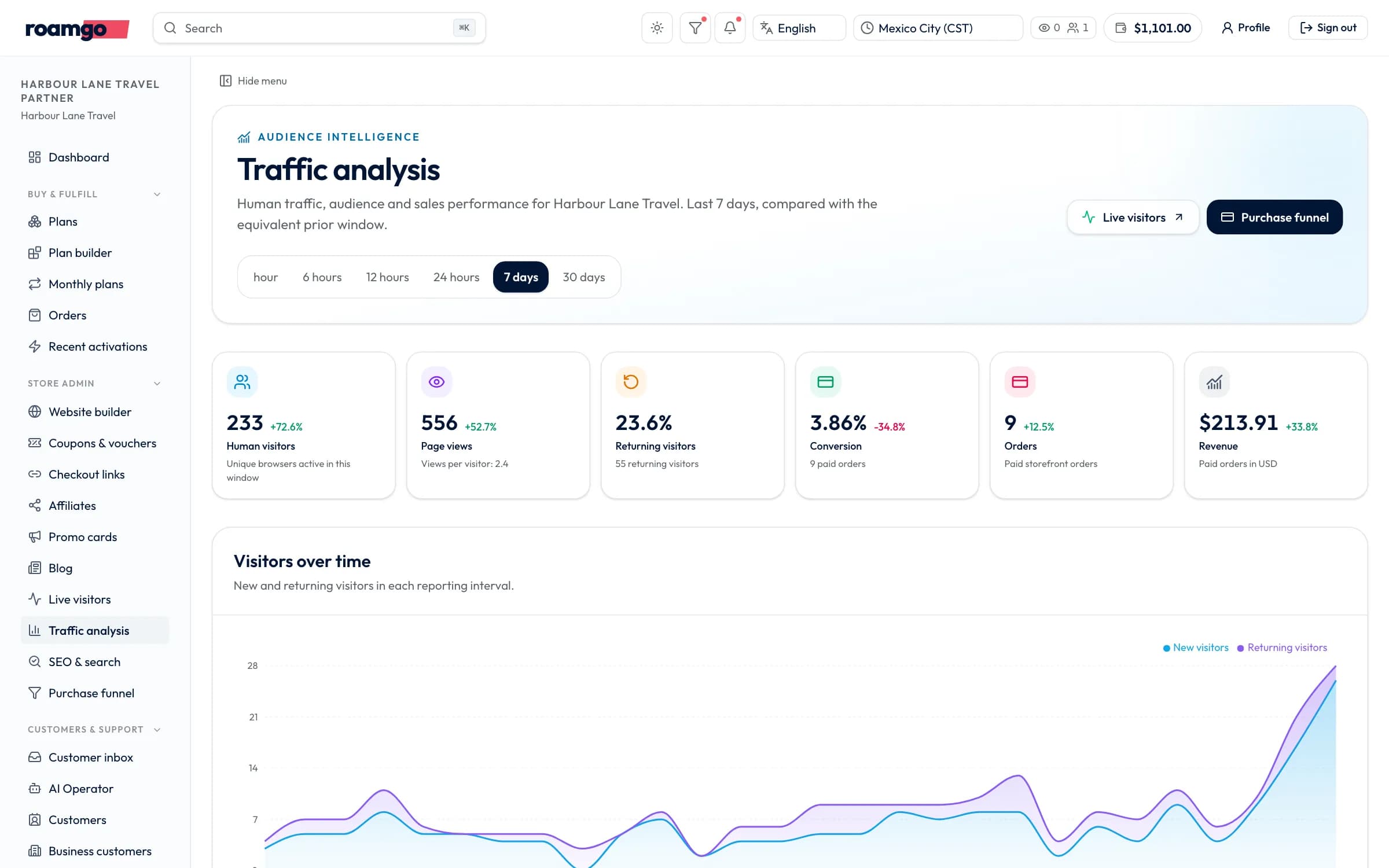
Analytics counts the people on your shop, not the bots: visitors, page views, returning visitors, orders, conversion and revenue, each compared with the period before. You can see where visitors come from, which pages they read, which countries and devices they use, who is on the shop right now, and a live funnel from plan to completed payment.
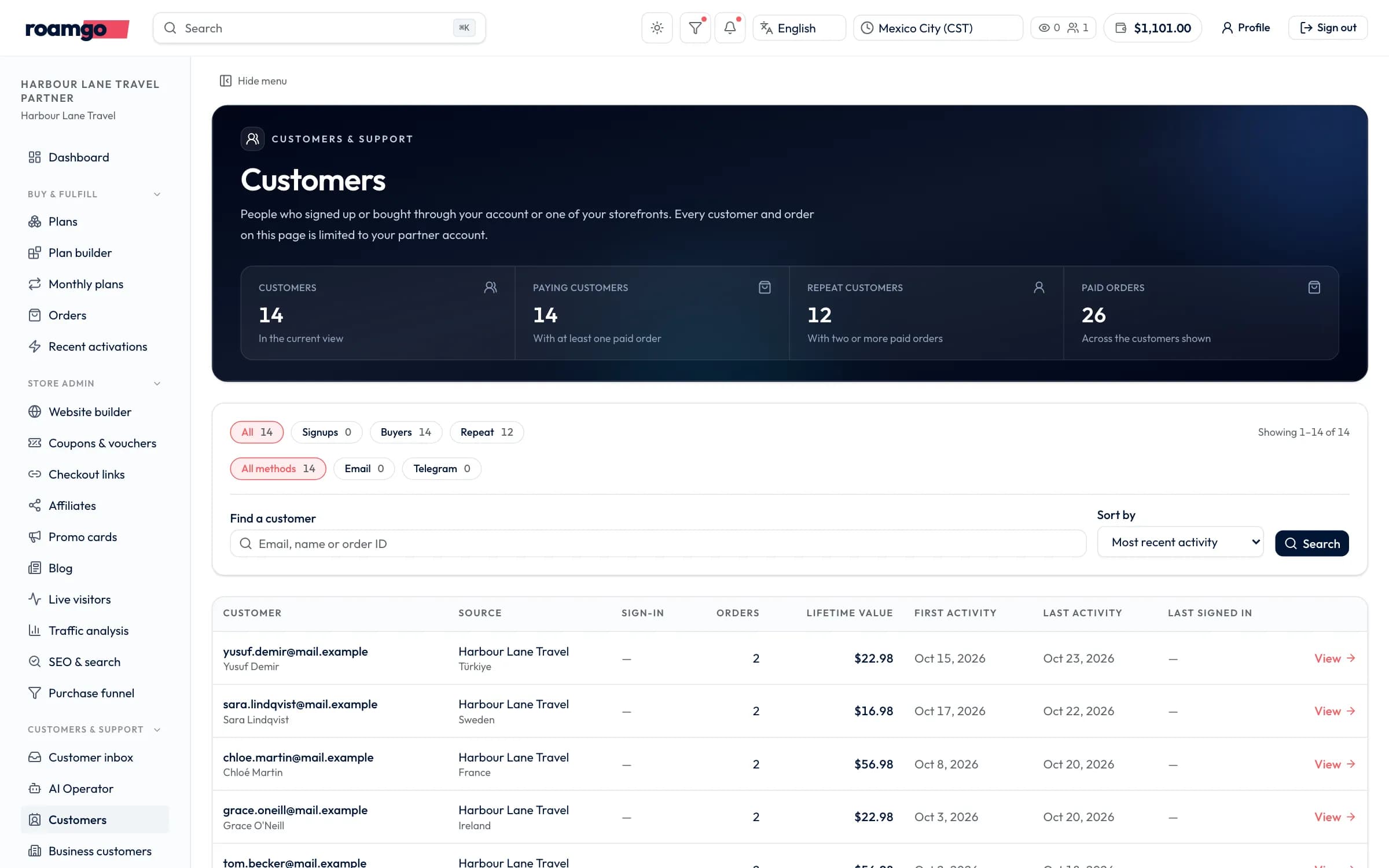
Customers lists everyone who bought from your shop, guests included, with search, filters for sign-ups, buyers and repeat customers, and a page per customer with their orders, eSIM activations, top-ups, support conversations and emails on one timeline.
Search performance comes from your own Google Search Console, connected in the panel.
Launch plan
Your first week as a RoamGo partner
- 01
Day 1
Create your partner account
Sign up for free, compare partner prices and start a shop draft in the website builder.
- 02
Day 2
Make the shop yours
Pick a theme, add your logo and words, choose which plans to sell and set your prices.
- 03
Day 3
Connect payments
Connect your Stripe account and finish Stripe's verification.
- 04
Day 4
Go live
Add your first $50 of credit, publish the shop and connect your domain.
- 05
Day 5
Set up support
Invite your team, forward your support email and teach the AI Operator your policies.
- 06
Day 7
Read the numbers
Check analytics and your first orders, then share the shop with your customers.
Open your own eSIM shop
Create a free partner account, see partner prices for every plan and start your shop in the website builder today.
Sources
Features and prices are as of October 24, 2026, from the RoamGo partner panel and the sources below.
- 1.Direct charges with Stripe Connect (Stripe Docs)
- 2.Using Connect with Standard connected accounts (Stripe Docs)
- 3.Search Console: about the tool (Google Search Central)
- 4.RoamGo Partner Program (RoamGo)
Editorial disclosure: RoamGo runs the Partner Program described here. Screenshots show a fictional demo partner; names, orders and amounts are invented.